

IP Settings Section
In this section, you can configure automatic IP address assignment for the device, or set a static IP address.
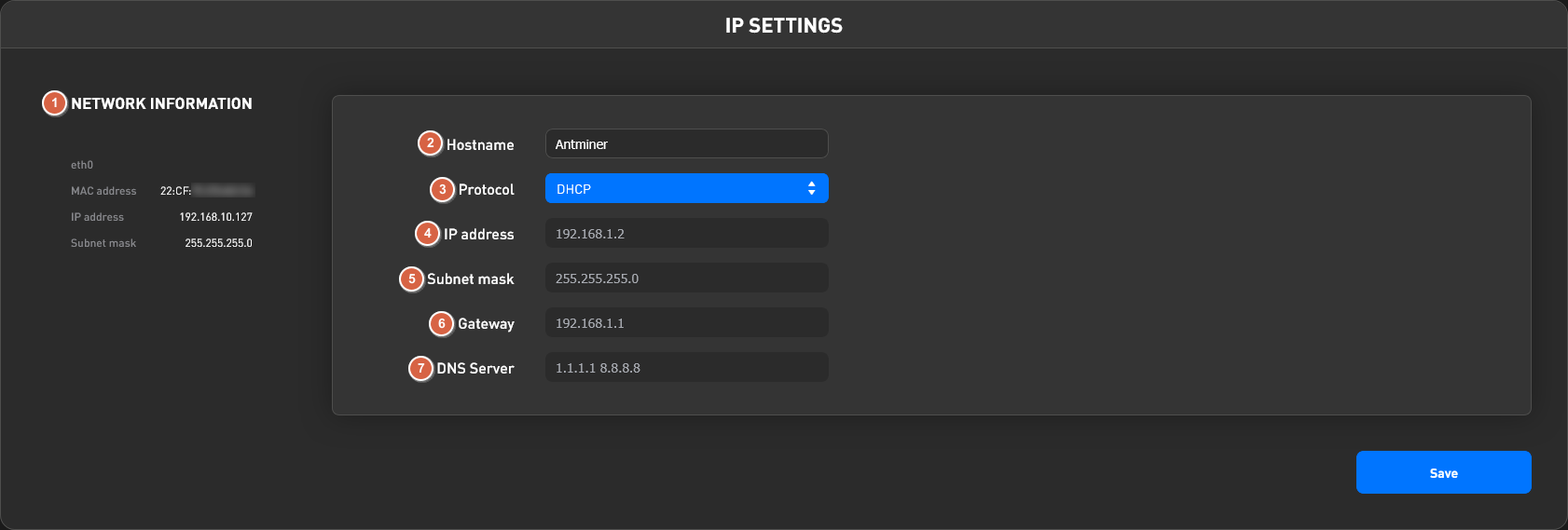
- Network information — information about the current connection (device MAC address, device IP address, subnet mask).
- Hostname — the device's name on the network. The device will be displayed under this name on the router's local network.
- Protocol — the IP address assignment protocol. Can be: DHCP (automatic IP address assignment from the router) or Static — statically configured IP address.
- IP address — field for specifying the device's IP address. Filled in when the Static protocol is configured.
- Subnet mask — the subnet mask. Filled in when the Static protocol is configured.
- Gateway — the gateway address (most often the first address in the subnet). Filled in when the Static protocol is configured.
- DNS Server — the DNS server address; you can specify several separated by commas. Filled in when the Static protocol is configured.