ASIC Miner Overclocking and Other Related Functions
To overclock the miner, you need to install the BiXBiT firmware. You can read the description of the flashing process in the corresponding section of the manual.
Whatsminer ASIC
The main overclocking settings for the device are located in the Overclock section.
In general, for overclocking an ASIC miner, we recommend using the generated profiles, as the device itself selects the most optimal settings during profile generation. However, if desired, you can set the overclocking settings manually. The basic recommendations for manual overclocking are described below.
General Overclocking Strategy
During Autotune, which lasts from 15 minutes to two hours (depending on conditions and parameters), the miner takes into account the parameters set in the Overclocking section.
The priority overclocking parameters for the miner are, in order of significance: PSU Power Limit (power limit), Target Voltage (target voltage), Target Freq (target frequency). Chip temperatures are also an important factor for autotuning.
In other words, according to the available power and temperatures, the miner sets the appropriate voltage and, in turn, the appropriate frequency for that voltage. There may be cases where, at the same voltage, the miner sets different frequencies.
However, when the available power supply capacity (PSU Power Limit) exceeds (or, conversely, does not cover) the requirements for the user-set voltage and frequency, the miner may deviate significantly from the set voltages and frequencies, either higher or lower. If the mismatch is too large, errors may occur during autotuning (for example, “Slot0 Lost Balance”).
At the same time, during operation, the miner may exceed the PSU Power Limit value itself, but as a rule, not by more than ~50-100 W.
Recommendations for Manual Overclocking
- Set PSU Power Max to the maximum power limit of the power supply, not exceeding 3900-4000W.
- Set PSU Power Limit to a “safe” power level available for long-term operation, but not exceeding 3800-3900W. It is strongly not recommended to exceed the factory limit.
- The difference between PSU Power Max and PSU Power Limit should be at least 200 W.
- Set approximate values for Target Frequency and Target Voltage. You should use the stock values as a reference.
- Set Minimum Voltage and Maximum Voltage within -50 and +50 of the desired Target Voltage.
During autotuning, the miner will select the optimal operating mode.
You can also set the same target, minimum, and maximum voltage (for example, 1430 / 1430 / 1430). In this case, the miner will not adjust the voltage, and the autotuning time will be reduced. However, it is recommended to “give freedom” to the miner.
During overclocking, you can use the following reference formulas:
- Target Frequency = F_Target_Normal * ( Percent + 100) / 100
- PSU Power Limit = P_Limit_Normal * ( Percent + 100) / 100
- Target Voltage = V_Target_Normal * ( Percent / 5.0 + 100) / 100
F_Target_Normal, P_Limit_Normal, V_Target_Normal: Base (original or “stock”) values of target frequency, power, and voltage. Percent: Overclocking percentage.
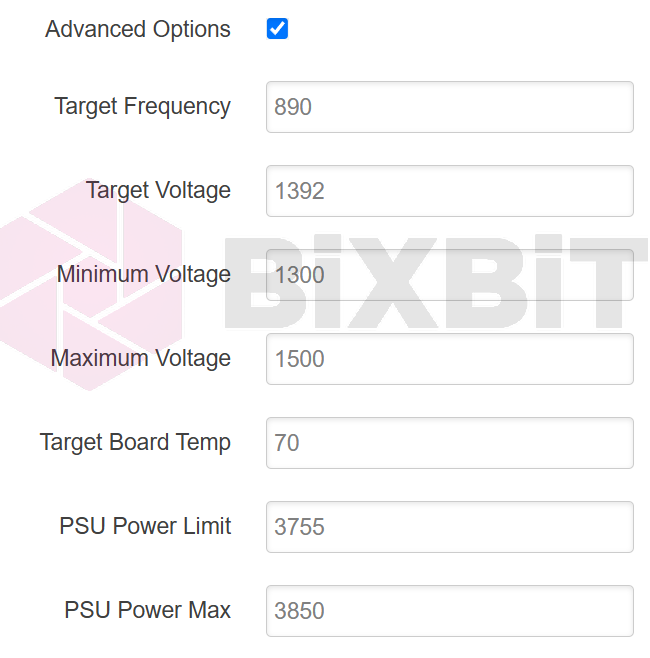
EXAMPLE OF OVERCLOCKING A WHATSMINER M32 BY 4.3%
Base (stock) values for this miner: F_Target_Normal = 853, P_Limit_Normal = 3600, V_Target_Normal = 1380 Thus:
- Target Frequency = 853 * ( 4,3 + 100) / 100 ~= 890
- PSU Power Limit = 3600 * ( 4,3 + 100) / 100 ~= 3755
- Target Voltage = 1380 * ( 4,3 / 5.0 + 100) / 100 ~= 1392
- Minimum Voltage = 1392 - 100 ~= 1300
- Maximum Voltage = 1392 + 100 ~= 1500
- PSU Power Max = 3755 + 100 ~= 3850